
We just rolled out two updates that make Expenzey easier to trust and easier to try. One helps you know your data is safe. The other helps you explore before you commit.
Here’s what changed.
#1 Google Drive Backup
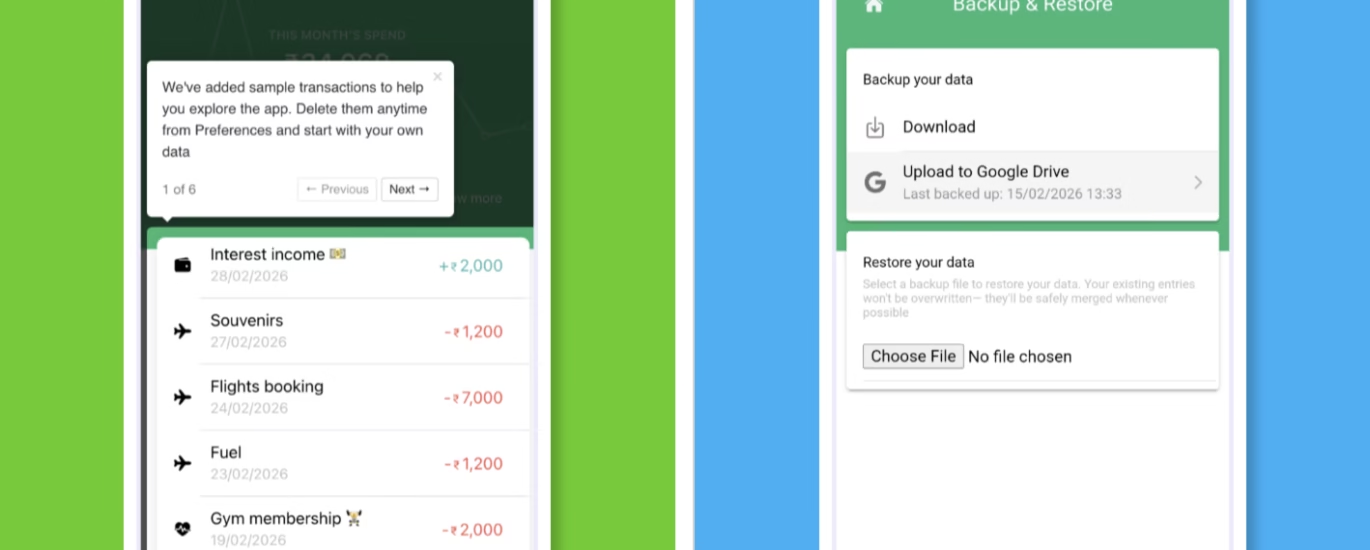
You already know Expenzey lets you back up your expenses to Google Drive with one tap. That’s been there since day one. But here’s what people kept asking: “Did it actually work? When was the last time my data was backed up?”
Fair question. You shouldn’t have to guess if your backup succeeded or wonder when you last synced.
Now, you don’t have to.
What’s new:
- You can now see the exact date and time of your last successful Google Drive backup
- Right there in the app. No digging. No guessing.
- The timestamp matches your preferred date format (because small details matter)
Why this matters:
Look, we all know we should back up data regularly. But life gets busy. Weeks pass. And suddenly you’re not sure if your data is safe anymore.
This simple timestamp removes that anxiety. You open the backup screen, see “Last backed up: Feb 10, 2026, 3:42 PM,” and you know. Either you’re synced, or it’s time to hit backup again.
It’s clarity when you need it most — especially before switching phones, factory resets, or just peace of mind at the end of the month.
How it works:
- Go to Settings → Backup & Restore
- You’ll see your last successful backup time clearly displayed
- If it’s been a while, tap Back up to Google Drive to sync again
- Your data stays in your Google Drive. We never see it. Privacy first, always.
Pro tip: Get into a habit. Check your backup timestamp once a month — maybe on the 1st, along with your monthly expense review. Two minutes. Zero stress.
#2 Sample Data on first time users – Try before you track
Here’s a problem most expense trackers have:
You download the app. Open it. And… it’s blank. Empty. You stare at a screen with nothing on it and try to imagine how it’ll look when you actually use it. You’re supposed to trust this app with your money data, but you can’t even see what tracking will feel like until you manually enter expenses. We flipped that.
What’s new:
When you first install Expenzey, the app now comes with sample data already loaded.
- Real-looking transactions across different categories
- Labels like “Food Delivery,” “Groceries,” “Transport,” “Entertainment”
- Sample summaries, calendar view, and reports – so you can explore before you commit
You get to see exactly how Expenzey works without entering a single expense.
Why this matters:
Most people don’t abandon expense trackers because they’re bad. They abandon them because they don’t understand how to use them until it’s too late.
Sample data fixes that. You can:
- See how daily summaries look
- Explore the calendar view and spot patterns
- Check how labels organize your spending
- Browse analytics and insights — all with realistic data
It’s like test-driving a car before buying it. Except the car is free and you’re just deciding if you want to put your own data in.
What happens to the sample data?
The moment you add your first real expense, the app becomes fully personalized to you. Sample data doesn’t interfere. It’s just there to help you learn. If you want to clear it earlier, you can. But most people find it helpful to explore first, then dive in once they’re comfortable.
The bigger picture
We built Expenzey around one core belief: your data should stay yours.
That’s why:
- Expenses are stored on your device by default (not our servers)
- Backups go to your Google Drive (we never see them)
- You control when backups happen (no automatic uploads without permission)
But privacy isn’t just about where data lives. It’s also about confidence and clarity.
These two updates — backup timestamps and sample data — are small features on paper. But they answer two questions people shouldn’t have to ask:
- “Is my data actually safe?” → Last backup timestamp tells you.
- “Will I actually use this app?” → Sample data lets you try before you commit.
New to Expenzey?
- Download the app
- Explore the sample data (no signup needed)
- When you’re ready, start tracking your own expenses
- Get Expenzey
Already using Expenzey?
- Update to the latest version
- Check your backup timestamp (Settings → Backup & Restore)
- Make sure your data is synced
Full changelog: expenzey.com/changelog




Valuable analysis for global demand forecasting
Practical advice for managing multi-region inventory
A well-balanced and informative article. The writing feels natural, and the structure helps guide the reader through the topic. I appreciate the focus on clarity and usefulness.
I truly appreciate your technique of writing a blog. I added it to my bookmark site list and will